远程调用
RPC(Remote Procedure Call):远程过程调用
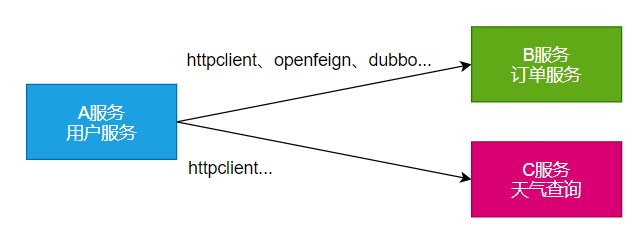 本地过程调用: a(); b(); a() { b();}: 不同方法都在同一个JVM运行
远程过程调用:
本地过程调用: a(); b(); a() { b();}: 不同方法都在同一个JVM运行
远程过程调用:
- 服务提供者:
- 服务消费者:
- 通过连接对方服务器进行请求\响应交互,来实现调用效果
API/SDK的区别是什么?
- api:接口(Application Programming Interface)
- 远程提供功能;
- sdk:工具包(Software Development Kit)
- 导入jar包,直接调用功能即可
开发过程中,我们经常需要调用别人写的功能
- 如果是内部微服务,可以通过依赖cloud、注册中心、openfeign等进行调用
- 如果是外部暴露的,可以发送 http 请求、或遵循外部协议进行调用
SpringBoot 整合提供了很多方式进行远程调用
- 轻量级客户端方式
- RestTemplate: 普通开发
- WebClient: 响应式编程开发
- Http Interface: 声明式编程
- Spring Cloud分布式解决方案方式
- Spring Cloud OpenFeign
- 第三方框架
- Dubbo
- gRPC
- ...
- 导入jar包,直接调用功能即可
1. WebClient
非阻塞、响应式HTTP客户端
1.1 创建与配置
发请求:
- 请求方式: GET\POST\DELETE\xxxx
- 请求路径: /xxx
- 请求参数:aa=bb&cc=dd&xxx
- 请求头: aa=bb,cc=ddd
- 请求体:
创建 WebClient 非常简单:
- WebClient.create()
- WebClient.create(String baseUrl)
还可以使用 WebClient.builder() 配置更多参数项:
- uriBuilderFactory: 自定义UriBuilderFactory ,定义 baseurl.
- defaultUriVariables: 默认 uri 变量.
- defaultHeader: 每个请求默认头.
- defaultCookie: 每个请求默认 cookie.
- defaultRequest: Consumer 自定义每个请求.
- filter: 过滤 client 发送的每个请求
- exchangeStrategies: HTTP 消息 reader/writer 自定义.
- clientConnector: HTTP client 库设置.
//获取响应完整信息
WebClient client = WebClient.create("https://example.org");
1.2 获取响应
retrieve()方法用来声明如何提取响应数据。比如
//获取响应完整信息
WebClient client = WebClient.create("https://example.org");

Mono<ResponseEntity<Person>> result = client.get()
        .uri("/persons/{id}", id).accept(MediaType.APPLICATION_JSON)
        .retrieve()
        .toEntity(Person.class);

//只获取body
WebClient client = WebClient.create("https://example.org");

Mono<Person> result = client.get()
        .uri("/persons/{id}", id).accept(MediaType.APPLICATION_JSON)
        .retrieve()
        .bodyToMono(Person.class);

//stream数据
Flux<Quote> result = client.get()
        .uri("/quotes").accept(MediaType.TEXT_EVENT_STREAM)
        .retrieve()
        .bodyToFlux(Quote.class);

//定义错误处理
Mono<Person> result = client.get()
        .uri("/persons/{id}", id).accept(MediaType.APPLICATION_JSON)
        .retrieve()
        .onStatus(HttpStatus::is4xxClientError, response -> ...)
        .onStatus(HttpStatus::is5xxServerError, response -> ...)
        .bodyToMono(Person.class);
1.3 定义请求体
//1、响应式-单个数据
Mono<Person> personMono = ... ;

Mono<Void> result = client.post()
        .uri("/persons/{id}", id)
        .contentType(MediaType.APPLICATION_JSON)
        .body(personMono, Person.class)
        .retrieve()
        .bodyToMono(Void.class);

//2、响应式-多个数据
Flux<Person> personFlux = ... ;

Mono<Void> result = client.post()
        .uri("/persons/{id}", id)
        .contentType(MediaType.APPLICATION_STREAM_JSON)
        .body(personFlux, Person.class)
        .retrieve()
        .bodyToMono(Void.class);

//3、普通对象
Person person = ... ;

Mono<Void> result = client.post()
        .uri("/persons/{id}", id)
        .contentType(MediaType.APPLICATION_JSON)
        .bodyValue(person)
        .retrieve()
        .bodyToMono(Void.class);
2. HTTP Interface
Spring 允许我们通过定义接口的方式,给任意位置发送 http 请求,实现远程调用,可以用来简化 HTTP 远程访问。需要webflux场景才可
2.1 导入依赖
<dependency>
    <groupId>org.springframework.boot</groupId>
    <artifactId>spring-boot-starter-webflux</artifactId>
</dependency>
2.2 定义接口
public interface BingService {

    @GetExchange(url = "/search")
    String search(@RequestParam("q") String keyword);
}
2.3 创建代理&测试
@SpringBootTest
class Boot05TaskApplicationTests {

    @Test
    void contextLoads() throws InterruptedException {
        //1、创建客户端
        WebClient client = WebClient.builder()
                .baseUrl("https://cn.bing.com")
                .codecs(clientCodecConfigurer -> {
                    clientCodecConfigurer
                            .defaultCodecs()
                            .maxInMemorySize(256*1024*1024);
                            //响应数据量太大有可能会超出BufferSize,所以这里设置的大一点
                })
                .build();
        //2、创建工厂
        HttpServiceProxyFactory factory = HttpServiceProxyFactory
                .builder(WebClientAdapter.forClient(client)).build();
        //3、获取代理对象
        BingService bingService = factory.createClient(BingService.class);


        //4、测试调用
        Mono<String> search = bingService.search("尚硅谷");
        System.out.println("==========");
        search.subscribe(str -> System.out.println(str));

        Thread.sleep(100000);

    }

}