Web安全
- Apache Shiro
- Spring Security
- 自研:Filter
Spring Security
1. 安全架构
1. 认证:Authentication
who are you? 登录系统,用户系统
2. 授权:Authorization
what are you allowed to do? 权限管理,用户授权
3. 攻击防护
- XSS(Cross-site scripting)
- CSRF(Cross-site request forgery)
- CORS(Cross-Origin Resource Sharing)
- SQL注入
- ...
扩展. 权限模型
1. RBAC(Role Based Access Controll)
- 用户(t_user)
- id,username,password,xxx
- 1,zhangsan
- 2,lisi
- 用户_角色(t_user_role)【N对N关系需要中间表】
- zhangsan, admin
- zhangsan,common_user
- lisi, hr
- lisi, common_user
- 角色(t_role)
- id,role_name
- admin
- hr
- common_user
- 角色_权限(t_role_perm)
- admin, 文件r
- admin, 文件w
- admin, 文件执行
- admin, 订单query,create,xxx
- hr, 文件r
- 权限(t_permission)
- id,perm_id
- 文件 r,w,x
- 订单 query,create,xxx
2. ACL(Access Controll List)
直接用户和权限挂钩
- 用户(t_user)
- zhangsan
- lisi
- 用户_权限(t_user_perm)
- zhangsan,文件 r
- zhangsan,文件 x
- zhangsan,订单 query
- 权限(t_permission)
- id,perm_id
- 文件 r,w,x
- 订单 query,create,xxx
@Secured("文件 r")
public void readFile(){
    //读文件
}
2. Spring Security 原理
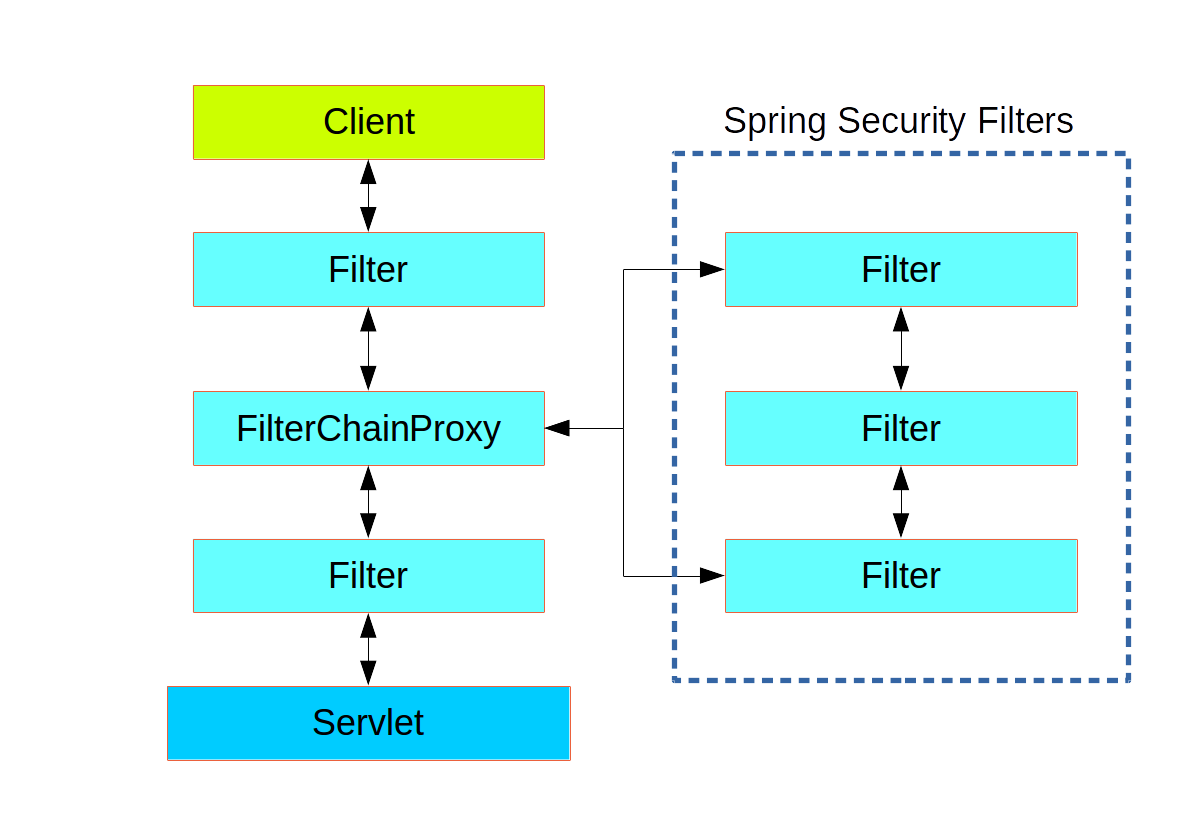
1. 过滤器链架构
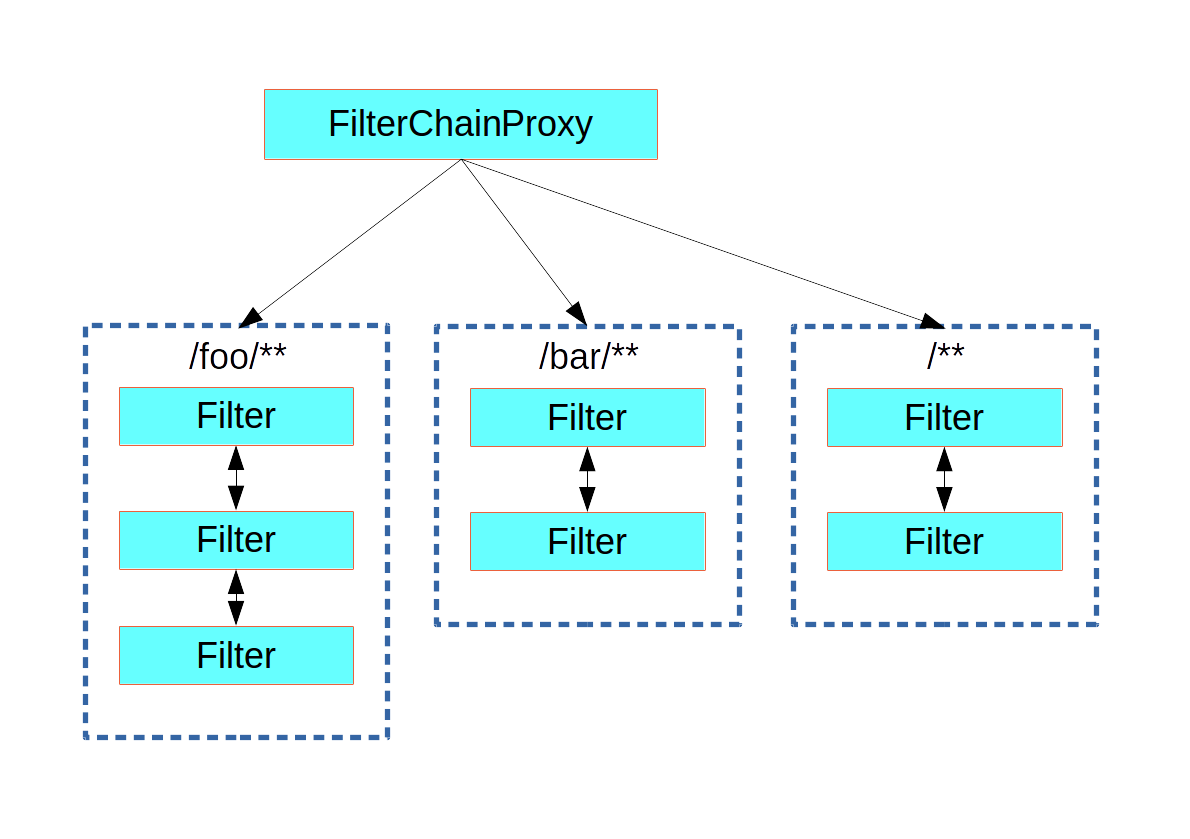
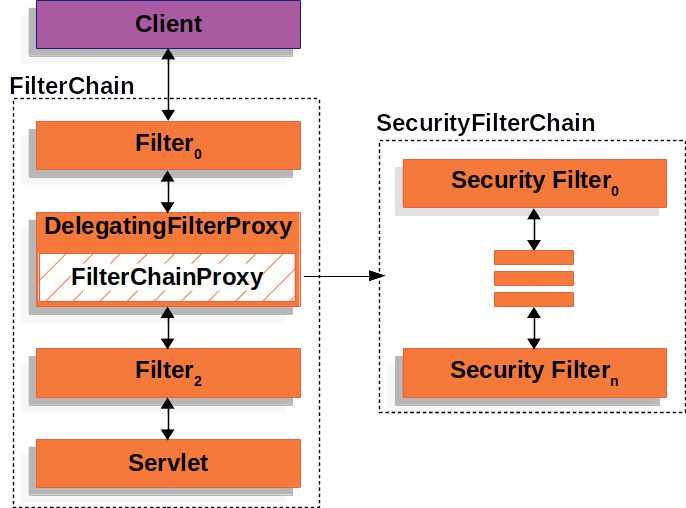
Spring Security利用 FilterChainProxy 封装一系列拦截器链,实现各种安全拦截功能 Servlet三大组件:Servlet、Filter、Listener
2. FilterChainProxy
3. SecurityFilterChain
3. 使用
1. HttpSecurity
@Configuration
@Order(SecurityProperties.BASIC_AUTH_ORDER - 10)
public class ApplicationConfigurerAdapter extends WebSecurityConfigurerAdapter {
  @Override
  protected void configure(HttpSecurity http) throws Exception {
    http.antMatcher("/match1/**")
      .authorizeRequests()
        .antMatchers("/match1/user").hasRole("USER")
        .antMatchers("/match1/spam").hasRole("SPAM")
        .anyRequest().isAuthenticated();
  }
}
2. MethodSecurity
@SpringBootApplication
@EnableGlobalMethodSecurity(securedEnabled = true)
public class SampleSecureApplication {
}

@Service
public class MyService {

  @Secured("ROLE_USER")
  public String secure() {
    return "Hello Security";
  }

}
核心
- WebSecurityConfigurerAdapter
- @EnableGlobalMethodSecurity: 开启全局方法安全配置
- @Secured
- @PreAuthorize
- @PostAuthorize
- UserDetailService: 去数据库查询用户详细信息的service(用户基本信息、用户角色、用户权限)
4. 实战
1. 引入依赖
<dependency>
    <groupId>org.springframework.boot</groupId>
    <artifactId>spring-boot-starter-data-redis</artifactId>
</dependency>
<dependency>
    <groupId>org.springframework.boot</groupId>
    <artifactId>spring-boot-starter-thymeleaf</artifactId>
</dependency>
<dependency>
    <groupId>org.springframework.boot</groupId>
    <artifactId>spring-boot-starter-security</artifactId>
</dependency>
<dependency>
    <groupId>org.springframework.boot</groupId>
    <artifactId>spring-boot-starter-web</artifactId>
</dependency>
<dependency>
    <groupId>org.mybatis.spring.boot</groupId>
    <artifactId>mybatis-spring-boot-starter</artifactId>
    <version>3.0.0</version>
</dependency>

<dependency>
    <groupId>org.springframework.boot</groupId>
    <artifactId>spring-boot-devtools</artifactId>
    <scope>runtime</scope>
    <optional>true</optional>
</dependency>
<dependency>
    <groupId>com.mysql</groupId>
    <artifactId>mysql-connector-j</artifactId>
    <scope>runtime</scope>
</dependency>
<dependency>
    <groupId>org.projectlombok</groupId>
    <artifactId>lombok</artifactId>
    <optional>true</optional>
</dependency>
<dependency>
    <groupId>org.springframework.boot</groupId>
    <artifactId>spring-boot-starter-test</artifactId>
    <scope>test</scope>
</dependency>
<dependency>
    <groupId>org.thymeleaf.extras</groupId>
    <artifactId>thymeleaf-extras-springsecurity6</artifactId>
    <!-- Temporary explicit version to fix Thymeleaf bug -->
    <version>3.1.1.RELEASE</version>
</dependency>
<dependency>
    <groupId>org.springframework.security</groupId>
    <artifactId>spring-security-test</artifactId>
    <scope>test</scope>
</dependency>
2. 页面
首页
<p>Click <a th:href="@{/hello}">here</a> to see a greeting.</p>
Hello页
<h1>Hello</h1>
登录页
<!DOCTYPE html>
<html xmlns="http://www.w3.org/1999/xhtml" xmlns:th="https://www.thymeleaf.org">
  <head>
    <title>Spring Security Example</title>
  </head>
  <body>
    <div th:if="${param.error}">Invalid username and password.</div>
    <div th:if="${param.logout}">You have been logged out.</div>
    <form th:action="@{/login}" method="post">
      <div>
        <label> User Name : <input type="text" name="username" /> </label>
      </div>
      <div>
        <label> Password: <input type="password" name="password" /> </label>
      </div>
      <div><input type="submit" value="Sign In" /></div>
    </form>
  </body>
</html>
3. 配置类
视图控制
package com.example.securingweb;

import org.springframework.context.annotation.Configuration;
import org.springframework.web.servlet.config.annotation.ViewControllerRegistry;
import org.springframework.web.servlet.config.annotation.WebMvcConfigurer;

@Configuration
public class MvcConfig implements WebMvcConfigurer {

    public void addViewControllers(ViewControllerRegistry registry) {
        registry.addViewController("/home").setViewName("index");
        registry.addViewController("/").setViewName("index");
        registry.addViewController("/hello").setViewName("hello");
        registry.addViewController("/login").setViewName("login");
    }
}
Security配置
package com.atguigu.security.config;

import org.springframework.context.annotation.Bean;
import org.springframework.context.annotation.Configuration;
import org.springframework.security.config.annotation.web.builders.HttpSecurity;
import org.springframework.security.config.annotation.web.configuration.EnableWebSecurity;
import org.springframework.security.core.userdetails.User;
import org.springframework.security.core.userdetails.UserDetails;
import org.springframework.security.core.userdetails.UserDetailsService;
import org.springframework.security.provisioning.InMemoryUserDetailsManager;
import org.springframework.security.web.SecurityFilterChain;

/**
 * @author lfy
 * @Description
 * @create 2023-03-08 16:54
 */
@Configuration
@EnableWebSecurity
public class WebSecurityConfig {

    @Bean
    public SecurityFilterChain securityFilterChain(HttpSecurity http) throws Exception {


        http
                .authorizeHttpRequests((requests) -> requests
                        .requestMatchers("/", "/home").permitAll()
                        .anyRequest().authenticated()
                )
                .formLogin((form) -> form
                        .loginPage("/login")
                        .permitAll()
                )
                .logout((logout) -> logout.permitAll());

        return http.build();
    }

    @Bean
    public UserDetailsService userDetailsService() {
        UserDetails user =
                User.withDefaultPasswordEncoder()
                        .username("admin")
                        .password("admin")
                        .roles("USER")
                        .build();

        return new InMemoryUserDetailsManager(user);
    }
}
4. 改造Hello页
<!DOCTYPE html>
<html
  xmlns="http://www.w3.org/1999/xhtml"
  xmlns:th="https://www.thymeleaf.org"
  xmlns:sec="https://www.thymeleaf.org/thymeleaf-extras-springsecurity6"
>
  <head>
    <title>Hello World!</title>
  </head>
  <body>
    <h1 th:inline="text">
      Hello <span th:remove="tag" sec:authentication="name">thymeleaf</span>!
    </h1>
    <form th:action="@{/logout}" method="post">
      <input type="submit" value="Sign Out" />
    </form>
  </body>
</html>